

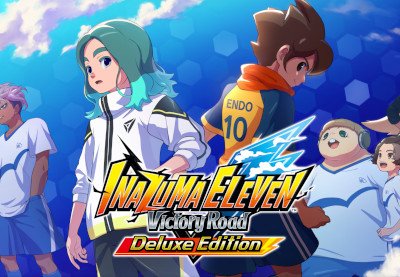
Getting Started with INAZUMA ELEVEN: Victory Road Deluxe Edition on PC Steam
$40.79
INAZUMA ELEVEN: Victory Road Deluxe Edition PC Steam Account
Includes:
- Base game
- Choose-a-Character Crate
- Bond Object: Football Club Room (Raimon)
- Bond Object: Rai Rai Noodles (Inazuma Town)
- Promise Pendant (equipment that boosts EXP gained)
- Victory Jump! (Goal Celebration)
Overview
INAZUMA ELEVEN returns with the latest installment in the hyperdimensional football RPG series!
Story Mode
Set 25 years after the original series, you follow the journey of Destin Billows, who enrolls at South Cirrus Junior High in a world where football is seemingly absent. At the same time, Harper Evans, a “football monster,” rises at the renowned Raimon Junior High. Their paths intertwine, leading to an epic tale.
Chronicle Mode
- Over 5,200 characters from previous entries to collect and train.
- Relive classic matches with Victorio, a time traveler.
- Assemble your dream team and compete against various teams.
Next-Gen Football Systems
- Manual Mode for direct control, or Commander Mode for strategic guidance.
- Enjoy tactical gameplay and unleash spectacular Special Moves to achieve victory.
Bond Station
- Create your own “Bond Town” with nostalgic items from the series.
- Customize your avatar, invite friends, and play matches together!
Ultimate Anime Experience
In collaboration with animation studio MAPPA, the game features in-game anime cutscenes, delivering the longest anime runtime in the series and enhancing the story’s intensity.
Experience the thrill of football like never before with the INAZUMA ELEVEN: Victory Road Deluxe Edition!
Description
Top-Up Price Comparison
| Store | Price | Currency | Delivery | Region | Rating | Buy |
|---|---|---|---|---|---|---|
| Green Man Gaming | $19.99 | USD | Instant | Global | ⭐⭐⭐⭐⭐ | Buy Now |
| Kinguin | $18.49 | USD | Instant | Global | ⭐⭐⭐⭐☆ | Buy Now |
How to Use INAZUMA ELEVEN: Victory Road Deluxe Edition
1. Setting Up Your Steam Account
- If you don’t have a Steam account, go to Steam’s website and create an account.
- Download and install the Steam client on your PC.
- Log in to your Steam account.
2. Activating Your Game
- Open the Steam client.
- Go to the “Games” menu at the top of the window.
- Select “Activate a Product on Steam.”
- Follow the prompts and enter the product code included with your purchase.
- Once activated, the game will be added to your library.
3. Installing the Game
- Go to your library in the Steam client.
- Find “INAZUMA ELEVEN: Victory Road Deluxe Edition” in your list of games.
- Click on the game title and then click the “Install” button.
- Choose your installation location and wait for the download to complete.
4. Starting the Game
- Once the installation is complete, click “Play” in your library to launch the game.
- Follow any on-screen instructions to begin your gaming experience.
5. Exploring Game Modes
- Choose between Story Mode and Chronicle Mode from the main menu.
- In Story Mode, follow the journey of Destin Billows and uncover the new narrative.
- In Chronicle Mode, relive classic matches and collect characters to build your ultimate team.
6. Customizing Your Experience
- Access the Bond Station to arrange nostalgic objects and create your “Bond Town.”
- Customize your avatar and invite friends to join you in matches.
- Experiment with different game styles by switching between Manual Mode and Commander Mode.
7. Enjoying the Game
- Engage in matches, use Special Moves, and strategize your gameplay.
- Take advantage of the in-game anime cutscenes to enhance your experience.
- Collect and train characters to improve your team and enjoy the vast content available.
8. Seeking Help
- If you encounter any issues, visit the Steam Community forums or the official Inazuma Eleven support page for assistance.



Reviews
There are no reviews yet.